Did your client miss their Home Report email in their inbox? Keep reading to learn how you can easily resend it.
1. Click the Home Report tab.
2. Click View on the client's corresponding row.

3. Click Resend Home Report.

Once resent, you will need to wait 72 hours to resend another Home Report to the same client.
Sending a Client's Home Report Link
If your client is having problem finding their Home Report email, you can also copy a live link of their Home Report and share it with them.
Please note, this is a live Home Report link and any actions taken in it (whether by you or anyone you share it with) will results in activity being shown inside your Home Report dashboard. We don't recommend using it to preview a Home Report. To learn how to preview a Home Report, click here.
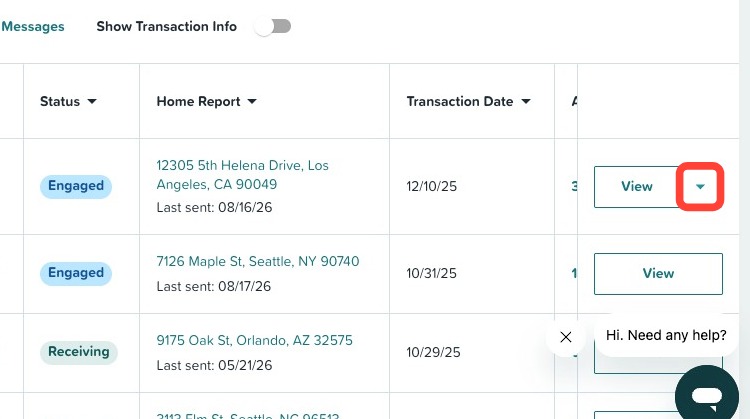
1 . Click the down-arrow in your client's corresponding row.
2. Click Copy link.
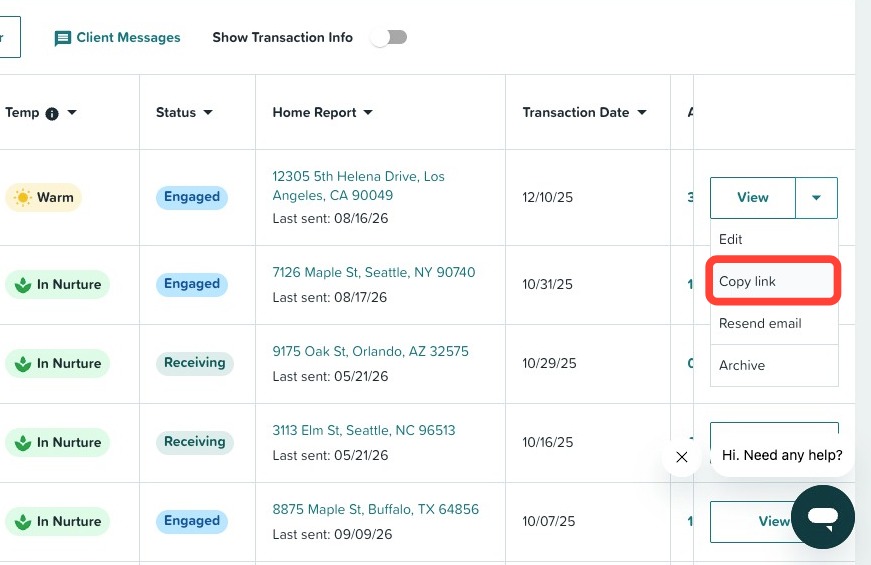
3. Once copied, you can share it with your client however you prefer. Simply paste it in an email, text, etc.
Need Help?
Still need help or have questions? Submit a ticket here.